AZ blackhole
AZ blackhole is an AWS fault that causes network blackhole by isolating traffic in specific availability zones across an entire region. You can control the blast radius by providing targeted VPC IDs for the AZ failure. This fault helps evaluates how well your applications and services handle the loss of network connectivity across the availability zone ensuring that failover mechanisms and redundancy strategies function as expected.
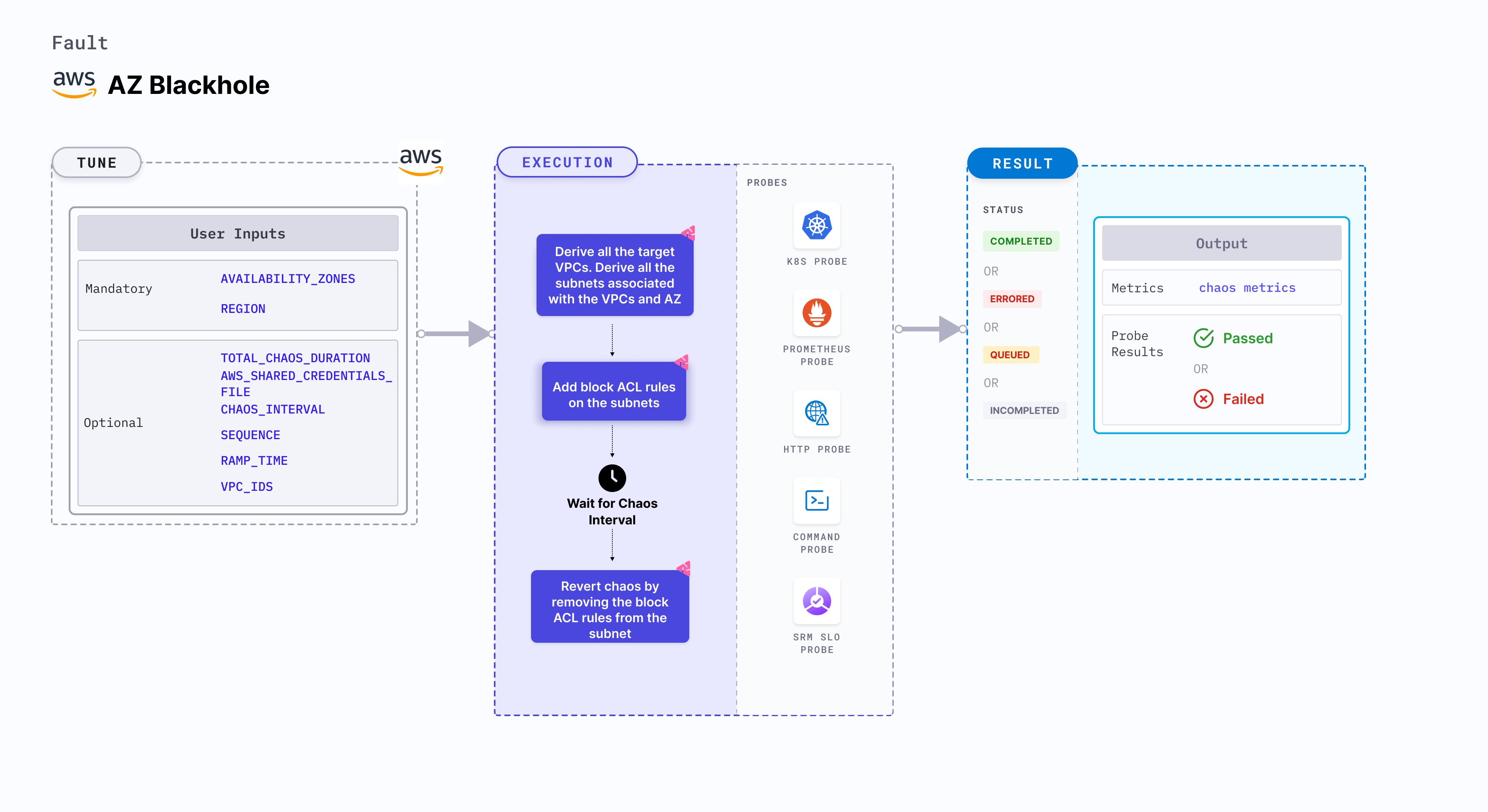
Use cases
AZ blackhole:
- Checks how the applications and services handle the loss of network connectivity in specific zones.
- Determines the effects of network isolation on critical business processes by simulating major network disruptions, helping teams to identify weak links and improve overall system robustness.
- Tests and refine disaster recovery plans by simulating AZ-level blackholes, ensuring that your infrastructure can efficiently reroute traffic and maintain operational continuity during large-scale outages.
Prerequisites
- Kubernetes >= 1.17
- Ensure you have the required AWS permissions to induce a network blackhole in the specified availability zone within the region..
- Ensure that the specified VPC (if provided) includes the target availability zone.
- The Kubernetes secret should have AWS access configuration (key) in the
CHAOS_NAMESPACE. Below is a sample secret file.apiVersion: v1
kind: Secret
metadata:
name: cloud-secret
type: Opaque
stringData:
cloud_config.yml: |-
# Add the cloud AWS credentials respectively
[default]
aws_access_key_id = XXXXXXXXXXXXXXXXXXX
aws_secret_access_key = XXXXXXXXXXXXXXX
Harness CE recommends that you use the same secret name, that is, cloud-secret. Otherwise, you will need to update the AWS_SHARED_CREDENTIALS_FILE environment variable in the fault template with the new secret name and you won't be able to use the default health check probes.
Below is an example AWS policy to execute the fault.
{
  "Version": "2012-10-17",
  "Statement": [
    {
      "Effect": "Allow",
      "Action": [
        "ec2:DescribeVpcs",
        "ec2:DescribeSubnets",
        "ec2:DescribeNetworkAcls",
        "ec2:CreateNetworkAcl",
        "ec2:ReplaceNetworkAclAssociation",
        "ec2:DeleteNetworkAcl",
        "ec2:CreateNetworkAclEntry",
        "ec2:ModifyNetworkAclEntry"
      ],
      "Resource": "*"
    },
    {
      "Effect": "Allow",
      "Action": [
        "ec2:DescribeInstances",
        "ec2:DescribeSecurityGroups",
        "ec2:DescribeNetworkInterfaces",
        "ec2:DescribeAvailabilityZones"
      ],
      "Resource": "*"
    }
  ]
}
- Go to superset permission/policy to execute all AWS faults.
- Go to common attributes and AWS-specific tunables to tune the common tunables for all faults and AWS-specific tunables.
- Go to AWS named profile for chaos to use a different profile for AWS faults.
Mandatory Tunables
| Tunable | Description | Notes |
|---|---|---|
| REGION | Region name for the target volumes. | For example, us-east-1. |
Optional Tunables
| Tunable | Description | Notes |
|---|---|---|
| TOTAL_CHAOS_DURATION | Duration to insert chaos (in seconds). | Default: 30 s. For more information, go to duration of the chaos. |
| AVAILABILITY_ZONES | Provide the target availability zones to cause the network blackhole. | For example, us-east-1a. For more information, go to availability zones. |
| VPC_IDS | Provide the VPC IDs to limit the impact, ensuring the AZ blackhole targets only those specific networks. | For example: "vpc-89765,vpc-78687". For more information, go to vpc ids. |
| SUBNET_IDS | Provide the subnet IDs to further limit the blast radius to specific subnets within the target VPCs. | For example: "subnet-0a1b2c3d,subnet-9z8y7x6w". For more information, go to subnet ids. |
| SUBNET_TAGS | Provide the subnet tags to target specific subnets by their tag key-value pairs. | For example: "env:production,team:backend". For more information, go to subnet tags. |
| AWS_SHARED_CREDENTIALS_FILE | Path to the AWS secret credentials. | Default: /tmp/cloud_config.yml. |
| CHAOS_INTERVAL | Duration between the attachment and detachment of the volumes (in seconds). | Default: 30 s. For more information, go to chaos interval. |
| SEQUENCE | Sequence of chaos execution for multiple volumes. | Default: parallel. Supports serial and parallel. For more information, go to sequence of chaos execution. |
| RAMP_TIME | Period to wait before and after injecting chaos (in seconds). | For example, 30 s. For more information, go to ramp time. |
Use Case Description
- If a user provides only the region parameter, then by default Harness selects all the VPCs in that region and the blast radius is maximum.
- If a user wants to control the blast radius, the options are:
- Region with VPC ID: Targets specific VPCs within the region.
- Region with VPC ID and Availability Zone: Targets specific availability zones within the specified VPCs.
- Region with VPC ID, AZ, and Subnet Tag: Targets subnets matching the specified tags within the given VPCs and availability zones.
- Region with VPC ID, AZ, and Subnet ID: Targets specific subnets by their IDs within the given VPCs and availability zones.
Availability Zones
Comma-separated list of the target availability zones under blackhole attach. Tune it by using the AVAILABILITY_ZONES environment variable.
The following YAML snippet illustrates the use of this environment variable:
# contains az blackhole for given az
apiVersion: litmuschaos.io/v1alpha1
kind: ChaosEngine
metadata:
  name: engine-nginx
spec:
  engineState: "active"
  chaosServiceAccount: litmus-admin
  experiments:
  - name: az-blackhole
    spec:
      components:
        env:
        # target availability zones for the chaos
        - name: AVAILABILITY_ZONES
          value: 'us-east-1a,us-east-1b'
        # region for chaos
        - name: REGION
          value: 'us-east-1'
VPC IDS
Comma-separated list of the VPC IDs to limit the impact. Tune it by using the VPC_IDS environment variable.
The following YAML snippet illustrates the use of this environment variable:
# contains vpc ids for given az
apiVersion: litmuschaos.io/v1alpha1
kind: ChaosEngine
metadata:
  name: engine-nginx
spec:
  engineState: "active"
  chaosServiceAccount: litmus-admin
  experiments:
  - name: az-blackhole
    spec:
      components:
        env:
        # target vpc ids for the chaos
        - name: VPC_IDS
          value: 'vpc-21312481928410,vpc-78926378028471'
        # target availability zones for the chaos
        - name: AVAILABILITY_ZONES
          value: 'us-east-1a,us-east-1b'
        # region for chaos
        - name: REGION
          value: 'us-east-1'
Subnet IDs
Comma-separated list of the subnet IDs to further limit the blast radius to specific subnets. Tune it by using the SUBNET_IDS environment variable.
The following YAML snippet illustrates the use of this environment variable:
# contains subnet ids for given az
apiVersion: litmuschaos.io/v1alpha1
kind: ChaosEngine
metadata:
  name: engine-nginx
spec:
  engineState: "active"
  chaosServiceAccount: litmus-admin
  experiments:
  - name: az-blackhole
    spec:
      components:
        env:
        # target subnet ids for the chaos
        - name: SUBNET_IDS
          value: 'subnet-0a1b2c3d4e5f,subnet-9z8y7x6w5v4u'
        # target availability zones for the chaos
        - name: AVAILABILITY_ZONES
          value: 'us-east-1a,us-east-1b'
        # target vpc ids for the chaos
        - name: VPC_IDS
          value: 'vpc-21312481928410'
        # region for chaos
        - name: REGION
          value: 'us-east-1'
Subnet Tags
Comma-separated list of the subnet tags (in key:value format) to target specific subnets. Tune it by using the SUBNET_TAGS environment variable.
The following YAML snippet illustrates the use of this environment variable:
# contains subnet tags for given az
apiVersion: litmuschaos.io/v1alpha1
kind: ChaosEngine
metadata:
  name: engine-nginx
spec:
  engineState: "active"
  chaosServiceAccount: litmus-admin
  experiments:
  - name: az-blackhole
    spec:
      components:
        env:
        # target subnet tags for the chaos
        - name: SUBNET_TAGS
          value: 'env:production,team:backend'
        # target availability zones for the chaos
        - name: AVAILABILITY_ZONES
          value: 'us-east-1a,us-east-1b'
        # target vpc ids for the chaos
        - name: VPC_IDS
          value: 'vpc-21312481928410'
        # region for chaos
        - name: REGION
          value: 'us-east-1'